Consumer information
Spending and safety: what to check before money changes hands
Advertising disclosure
This page is funded by advertising. The buttons on it are partner links: if you follow one and install the game, Celusagruna s.r.o. may be paid a commission by the advertiser. You pay nothing extra, and the commission does not buy a favourable review. Where this guide is critical of the game — and it is, in places — that criticism stands regardless of the commercial relationship.
Read the editorial policy for how advertising is kept separate from what is written here.
This page exists because we advertise a game that sells randomised purchases. If we are going to take a commission for pointing you at it, the least we can do is set out what to check first — including the parts nobody advertising a game wants to mention.
1. Understand what "random items" means
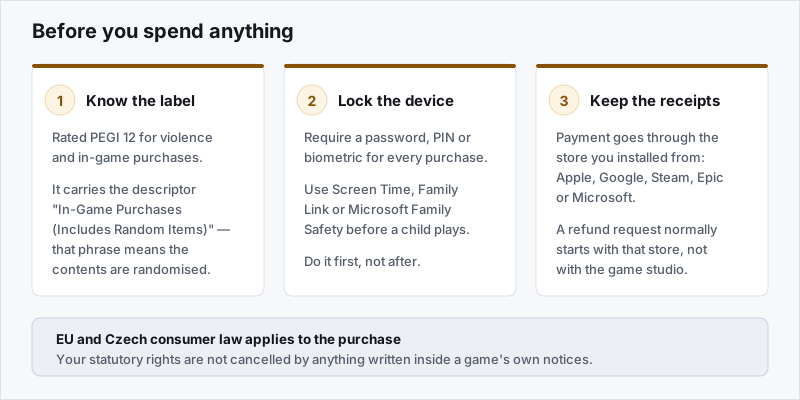
In Europe, RAID: Shadow Legends is rated PEGI 12, for violence and for in-game purchases. The descriptor it carries is "In-Game Purchases (Includes Random Items)".
That phrase is not decorative. PEGI applies it specifically to games where paid items have randomised contents — loot boxes, gacha draws, card packs. It is the formal warning that you are buying a chance, not a thing.
The practical consequence: no amount of money guarantees a specific champion. Buying ten times as many shards buys ten times as many draws, not a result. Anyone telling you a particular purchase gets you a named champion is describing a targeted event with its own published rules — or is simply wrong.
The game publishes its summon chances in the client. Read them before you buy, not after. Read them when you are not looking at a countdown.
2. Lock the device before anyone plays
Do this first, not after a bill arrives.
- iPhone and iPad: Settings → Screen Time → Content & Privacy Restrictions, and require a password for every purchase rather than remembering it for fifteen minutes.
- Android: Google Play → Settings → Authentication → require authentication for all purchases. Google Family Link for a child's account.
- Windows and Xbox accounts: Microsoft Family Safety, with spending limits and purchase approval.
- Steam: Steam Guard and Family View.
Requiring a password or biometric for every purchase is the single most effective control, because the risk in this genre is not a considered decision — it is a quick one made during a session.
3. Know where a refund request goes
Payment for in-app purchases runs through the store you installed from, not through the game studio. That means a refund request normally starts there:
| Where you installed from | Where a refund request starts |
|---|---|
| Apple App Store | Apple's "Report a Problem" purchase history process |
| Google Play | Google Play order history / Play refund request |
| Steam | Steam Support, through your purchase history |
| Epic Games Store | Epic account purchase history |
| Microsoft Store | Microsoft account order history |
Keep the receipts. Store refund policies differ and are discretionary in many cases, but a documented request made promptly is treated far better than one made months later. If a child made purchases on an adult's account without permission, say so explicitly — the stores have specific processes for that.
4. Your rights as an EU consumer
We are not lawyers and this is not legal advice, but a few things are worth knowing in outline:
- Statutory rights are not waived by in-game text. A notice inside an app cannot remove consumer rights that EU law gives you.
- Digital content has its own rules. The EU Digital Content Directive (2019/770) covers supply of digital content and what happens when it is defective. Note that the ordinary 14-day withdrawal right for digital content can be lost once supply begins with your express consent — which is usually exactly what happens when an in-app purchase is credited instantly.
- Unfair commercial practices are prohibited under Directive 2005/29/EC, including misleading claims about what a purchase gets you.
- Enforcement in the Czech Republic sits with the Czech Trade Inspection Authority (Česká obchodní inspekce). If you are elsewhere in the EU, your national consumer authority or the European Consumer Centre network is the place to start.
Remember that your contract for an in-app purchase is with the store or the publisher — never with us. We sell nothing and process no payments.
5. Setting your own limits
Design that encourages spending is not accidental, and recognising it is easier than resisting it in the moment:
- Decide a monthly figure before you start, and treat it as a budget rather than a ceiling to reach.
- Be wary of time-limited offers. Urgency is a sales technique. A pack that is genuinely worth it now will be worth it after you have thought about it.
- Watch for chasing. Spending more because a previous purchase disappointed you is the pattern worth noticing. The odds do not know what you have already spent.
- Use a prepaid balance rather than a stored card, so the limit is structural rather than a matter of willpower.
If gaming spending has stopped feeling like a choice, that is worth taking seriously and worth talking to someone about. National health services and gambling-support charities across the EU cover game spending as well as gambling, and speak to family members too, not only the person spending.
6. Accounts and security
- Bind the account to an email or platform login early, so progress survives a lost device.
- Never buy or sell accounts or currency through third parties. It breaches the game's terms, there is no recourse when it goes wrong, and it is a standard vector for payment fraud.
- Treat anyone offering free premium currency as a scam. Without exception.
Accuracy note. Game mechanics, prices, offers and ratings change without notice. Where anything here differs from the official information published by the game publisher or the platform, the official information prevails. Found something wrong? Tell us — we correct errors and say what we corrected.
miravain.online is operated by Celusagruna s.r.o. and is not affiliated with, endorsed by or sponsored by Plarium Games, Modern Times Group, Apple, Google, Valve, Epic Games or Microsoft. All trade marks are the property of their respective owners.
All diagrams on this site are original SVG files drawn by us. No product screenshots or stock photography are used.